v1.6.7
latest Aug 18, 2026 · 4.9 MBChanges
- Updated flat bars, vertical menu and window textures
- Refreshed window definitions for the 1.65 client
For the Blackthorn freeshard · client 1.65
A flat, dark amber interface built for RvR on the Blackthorn freeshard. Readable in the middle of a fight, quiet the rest of the time, and fully configurable from a small graphic tool: you never edit a single XML file.
Where is the main menu bar?
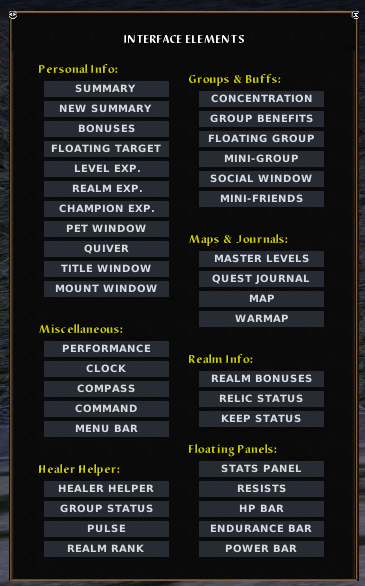
The main menu bar (inventory, combat, quests and the rest) is hidden by default. In game, press Escape, open Interface Elements, then click Menu Bar to display it.
Où est la barre de menu principale ?
La barre de menu principale (inventaire, combat, quêtes et le reste) est masquée par défaut. En jeu, appuie sur Échap, ouvre Interface Elements, puis clique sur Menu Bar pour l'afficher.
Design
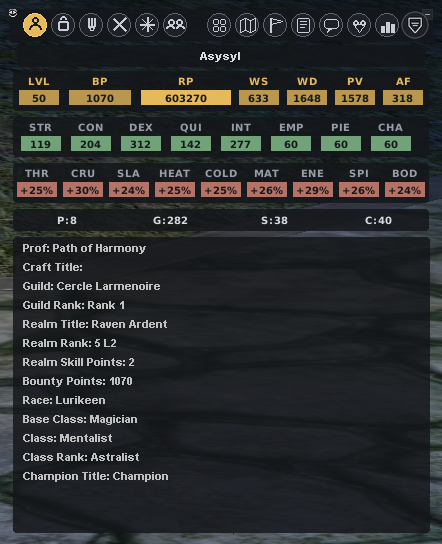
Gone are the golden textures of 2001. Every window of the 1.65 client sits on the same visual system: flat cards, coloured chips (amber for realm points, green for attributes, red for resists), flat scrollbars, and a banner of modern monochrome icons.
Configurator
Close the game, double click Config.bat, pick, apply. Five font families ship with the UI and any .ttf you drop in the folder joins the list. Four global sizes (M, L at x1.15, XL at x1.3, XXL at x1.5). Two bar styles for target, player and group: Bysan thin bars or Atlantis Flat. A .bak backup is written on every apply.
Server integration
The old Command window has been rebuilt into a real toolbar: COMBAT (attack, stick, face, follow, sprint, sit), ACTIONS (release, pray, bind, afk, mount, pet), WINDOWS (map, warmap, quiver, concentration, clock, compass, social, friends, journal) and a REALM section with the auto group finder, realm bonuses and relic status. One keybind opens all of it.
Screen space
Quickbars use the flat Bysan style: discreet numbers, invisible background, with an icons only variant in the configurator. Stats and resists detach into borderless floating strips you can park anywhere. The healer helper comes in 2x4, 4x2 and 1x8 layouts, with or without slot numbers.
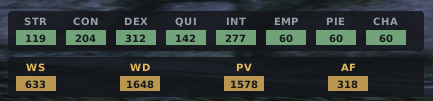
Real captures of the current build, window by window. Click any of them to open the full size viewer.
The banner across the top swaps the 2001 sprites for modern monochrome icons (game-icons.net, CC-BY). Level, bounty and realm points sit in amber chips, attributes in green, resists in red, and the flat info card lists guild, realm rank and class titles.
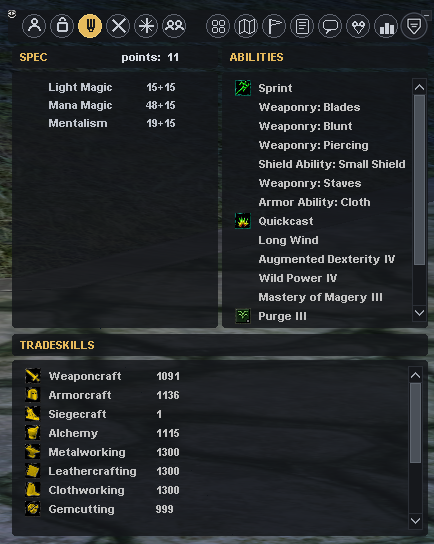
One window, three flat panels. Remaining spec points stay visible at the top, ability and tradeskill lists scroll on slim flat scrollbars instead of the stock stone buttons.
Every window of the client, one click away, grouped by family: personal info, groups and buffs, maps and journals, realm info, floating panels and the healer helper. No more hunting through slash commands to find a lost window.
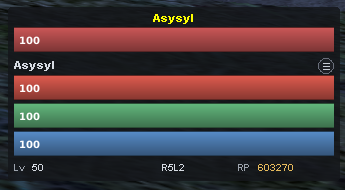
Health, endurance and power as flat gradient bars: vertical gradient, a 1 pixel darker outline, no black drop shadow, and the white percentage printed inside the bar. Level, realm rank and realm points line the base.
Attributes and weapon numbers as chips, without any window frame. Park it near your quickbars or along an edge: it reads like a HUD, not like a window.
The nine resists in a single row of red chips. Useful when a caster train shows up and you want the answer in half a second.
Released Aug 18, 2026 · 4.9 MB
SHA-256: 630a0647e42cc328afd49185697ba5c99c5dd44711357031970d9443bf4d9f9b
Every zip ships with its SHA-256 checksum. Downloads go through an anonymous counter: no IP address is ever stored in clear text.
**Important**: run Config.bat again after updating to regenerate your settings.
It is built for the 1.65 client of the Blackthorn server, including its toolbar wired to server specific commands. It may load on other 1.65 freeshards but this is neither tested nor guaranteed. For the Eden server, use Cfmike Eden Flat UI instead.
Slash commands specific to the server (/loyalty, market explorer and friends) can be turned into macros in game, for example /macro Loyal /loyalty, then dragged onto a quickbar like any ability.
Yes, twice over: the configurator offers four global font sizes (M to XXL), and the client itself scales the whole UI when you hold right click on the top left corner of the screen and drag.
Yes. It is a classic interface skin placed in the game's ui/custom folder, a mechanism the client is designed for. No game file is modified, and the configurator writes a .bak backup on every apply.
Select the default interface again in the game options, or delete the custom/ folder. Nothing else to do.
Use the feedback page: every request is read and answered there, and the good ideas end up in the next release. The Blackthorn server Discord, interface channel, works too.